
Imagine asking an AI assistant to help you catch up on a discussion, find a post, or prepare a thread for your XenForo community—all from the conversation where you already work.
Axvoid MCP Hub connects XenForo to an AI application that supports MCP and OAuth. It can help you explore forum content your connected account is allowed to access and prepare supported content or administration proposals for review. Your forum team stays in control: the connection has defined capabilities, and proposals are not published or applied until an authorized person approves them.
Axvoid MCP Hub connects XenForo to an AI application that supports MCP and OAuth. It can help you explore forum content your connected account is allowed to access and prepare supported content or administration proposals for review. Your forum team stays in control: the connection has defined capabilities, and proposals are not published or applied until an authorized person approves them.
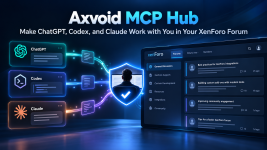
What Is Axvoid MCP Hub?
Axvoid MCP Hub is a XenForo add-on that provides a defined set of forum tools to a connected AI application through the Model Context Protocol (MCP) and OAuth.
The tools available to each connection depend on its settings, the connected XenForo member’s permissions, and the applicable Axvoid licence. You make requests in your AI conversation, then review proposals in your forum.
Find and Read Accessible DiscussionsAxvoid MCP Hub is a XenForo add-on that provides a defined set of forum tools to a connected AI application through the Model Context Protocol (MCP) and OAuth.
The tools available to each connection depend on its settings, the connected XenForo member’s permissions, and the applicable Axvoid licence. You make requests in your AI conversation, then review proposals in your forum.
Ask your AI application to:
- List forums visible to the connected XenForo member.
- List threads in a forum that member can access.
- Read posts from a thread that member can view.
- Search accessible forum content using XenForo search.
Access follows the connected member’s permissions. Results are returned in limited pages, and search follows XenForo’s search behavior. MCP Hub does not provide an unrestricted export of forum content.
Prepare Threads, Replies, and Forum Changes
With the required Pro entitlement and connection capabilities enabled, the AI application can prepare proposals for review.
Content proposals include a new thread or a reply to an existing thread. Administrative proposals cover specific supported actions, including:
Prepare Threads, Replies, and Forum Changes
With the required Pro entitlement and connection capabilities enabled, the AI application can prepare proposals for review.
Content proposals include a new thread or a reply to an existing thread. Administrative proposals cover specific supported actions, including:
- Creating a forum or updating supported forum settings.
- Changing selected board options: the board title, board description, tagging setting, or home page URL.
- Updating a member’s location or About text, or adding or removing a secondary user group.
- Creating or updating user groups and changing a limited set of supported permissions.
- Creating or updating styles, or setting the default style.
These are specific supported actions, not unrestricted XenForo administration.
Review Every Proposal Before It Is Applied
A proposal remains pending until an authorized reviewer inspects it and approves or rejects it. The AI application does not publish threads or replies, or apply administration changes, on its own.
Applying an approved proposal remains subject to the reviewer’s XenForo permissions, the connection’s settings, the target’s current state, and a valid Pro entitlement. The AI application can check the status of proposals it submitted; it does not automatically monitor or approve them.
Basic and Pro
Review Every Proposal Before It Is Applied
A proposal remains pending until an authorized reviewer inspects it and approves or rejects it. The AI application does not publish threads or replies, or apply administration changes, on its own.
Applying an approved proposal remains subject to the reviewer’s XenForo permissions, the connection’s settings, the target’s current state, and a valid Pro entitlement. The AI application can check the status of proposals it submitted; it does not automatically monitor or approve them.
Basic and Pro
Basic | Pro |
|---|---|
Manage connections and their settings | Prepare thread and reply proposals |
Browse forums visible to the connected member | Prepare supported forum and selected board-option proposals |
List accessible threads and read their posts | Prepare limited member, user-group, permission, and style proposals |
Search accessible forum content | Proposals require review and approval before they are applied |
Available tools also depend on connection settings and XenForo permissions. Pro entitlement is checked when proposals are prepared and again before an approved change is applied.
Permissions and Product Boundaries
Administrators control each connection’s capabilities and select the XenForo member identity used for publishing and approved actions. That member’s permissions determine which forum content and actions are available to the connection.
Axvoid MCP Hub does not provide arbitrary PHP execution, unrestricted database access, destructive administration, add-on installation, or editing of XenForo templates, CSS, or JavaScript. It does not publish or apply proposals automatically.
Compatibility and Requirements
Axvoid MCP Hub requires:
Permissions and Product Boundaries
Administrators control each connection’s capabilities and select the XenForo member identity used for publishing and approved actions. That member’s permissions determine which forum content and actions are available to the connection.
Axvoid MCP Hub does not provide arbitrary PHP execution, unrestricted database access, destructive administration, add-on installation, or editing of XenForo templates, CSS, or JavaScript. It does not publish or apply proposals automatically.
Compatibility and Requirements
Axvoid MCP Hub requires:
- XenForo 2.3.0 or later.
- PHP 8.2.0 or later.
- An AI application that supports MCP and OAuth.
- A secure HTTPS connection.
- An applicable Axvoid licence for the requested capabilities.
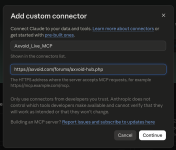
Connection steps vary by application. Check the current product information and connection guides for the instructions that apply to your setup.
Is Axvoid MCP Hub Right for Your Forum?
Axvoid MCP Hub may suit your forum if you want an AI application to help explore accessible discussions, prepare threads or replies, or draft specific forum changes for an authorized person to review.
It may not suit a workflow that requires automatic publishing, unrestricted control over XenForo, or access beyond the connected member’s permissions.
Try Axvoid MCP Hub
Customers who purchase Axvoid MCP Hub through the live Axvoid site can request a 24-hour trial key to try the add-on on their live XenForo site.
View Axvoid MCP Hub in the Axvoid Store for product, licence, and setup details.
View Axvoid MCP Hub installation guide
Is Axvoid MCP Hub Right for Your Forum?
Axvoid MCP Hub may suit your forum if you want an AI application to help explore accessible discussions, prepare threads or replies, or draft specific forum changes for an authorized person to review.
It may not suit a workflow that requires automatic publishing, unrestricted control over XenForo, or access beyond the connected member’s permissions.
Try Axvoid MCP Hub
Customers who purchase Axvoid MCP Hub through the live Axvoid site can request a 24-hour trial key to try the add-on on their live XenForo site.
View Axvoid MCP Hub in the Axvoid Store for product, licence, and setup details.
View Axvoid MCP Hub installation guide

Private Xenforo Addons
Axvoid Prompt Library: Build an AI Prompt Library Inside Your XenForo Community