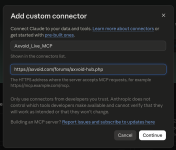
Useful AI prompts are easier to reuse when your community can find them, understand how they work, and adapt them to different tasks.
Axvoid Prompt Library adds a searchable prompt library to XenForo. Organize prompts into categories, add tags and supporting information, and let members browse, contribute, and save useful entries according to the permissions you set.
Axvoid Prompt Library adds a searchable prompt library to XenForo. Organize prompts into categories, add tags and supporting information, and let members browse, contribute, and save useful entries according to the permissions you set.
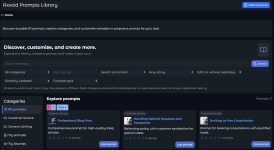
Browse and Find Prompts
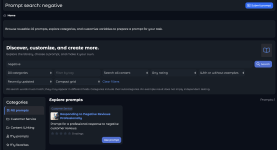
Members with permission to view the library can search prompt content and explore prompts by category or tag. They can also filter and sort results, including by rating, update date, publication date, or views. Additional filters help members find prompts with example outputs or a selected minimum rating.
Each prompt can include a title, description, featured image, usage notes, and an example output. The details depend on what the prompt’s author provides.
Members with permission to view the library can search prompt content and explore prompts by category or tag. They can also filter and sort results, including by rating, update date, publication date, or views. Additional filters help members find prompts with example outputs or a selected minimum rating.
Each prompt can include a title, description, featured image, usage notes, and an example output. The details depend on what the prompt’s author provides.
Customize, Preview, and Copy
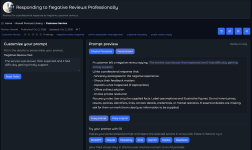
Prompts can include customizable fields for information that changes from one use to another. Members can enter their own values and preview the personalized prompt in their browser.
They can copy either the customized version or the original prompt, and reset the fields to their default values. Personalizing or copying a prompt does not change the published entry.
Favorites and Ratings
Members with the required permissions can save prompts to their favorites and return to them later. They can also rate published prompts when rating is enabled for their user group. Authors cannot rate their own prompts.
Contributions and Publishing Controls
You decide how members can participate through XenForo user-group permissions. Depending on the permissions you grant, members can:
Prompts can include customizable fields for information that changes from one use to another. Members can enter their own values and preview the personalized prompt in their browser.
They can copy either the customized version or the original prompt, and reset the fields to their default values. Personalizing or copying a prompt does not change the published entry.
Favorites and Ratings
Members with the required permissions can save prompts to their favorites and return to them later. They can also rate published prompts when rating is enabled for their user group. Authors cannot rate their own prompts.
Contributions and Publishing Controls
You decide how members can participate through XenForo user-group permissions. Depending on the permissions you grant, members can:
- View the prompt library.
- Submit prompts.
- Edit their own entries.
- Publish entries directly.
- Favorite and rate prompts.
A member who can submit but lacks publishing permission submits their prompt for review. Administrators can manage prompts, categories, tags, and submissions through the XenForo Admin Control Panel.
Authors and administrators with the appropriate access can review revision history and compare prompt versions. An author can edit their own entry only when they also have the required permission.
Configure the Library for Your Forum
Administrators can enable or disable the library, choose its default layout, select how prompt images appear, and set how many prompts are shown per page. The add-on also includes a Latest Prompts widget that can be configured for your forum layout.
What Version 1.2.13 Updates
Version 1.2.13 updates the add-on’s license verification routing. The staging domain uses the staging license service, while other configured domains use the production license service.
This release updates the licensing integration. It does not add new prompt-library features to the member-facing interface.
Requirements
Authors and administrators with the appropriate access can review revision history and compare prompt versions. An author can edit their own entry only when they also have the required permission.
Configure the Library for Your Forum
Administrators can enable or disable the library, choose its default layout, select how prompt images appear, and set how many prompts are shown per page. The add-on also includes a Latest Prompts widget that can be configured for your forum layout.
What Version 1.2.13 Updates
Version 1.2.13 updates the add-on’s license verification routing. The staging domain uses the staging license service, while other configured domains use the production license service.
This release updates the licensing integration. It does not add new prompt-library features to the member-facing interface.
Requirements
- XenForo 2.3 or later
- PHP 8.1 or later
- Axvoid License Server 1.4.54 or later
- A valid Axvoid Prompt Library license activated for your forum domain
Access Through Axvoid Private
Axvoid Prompt Library is included with an active monthly or annual Axvoid Private subscription, subject to the applicable licensing terms. An eligible subscription provides access to Axvoid’s private products. To activate the add-on, connect your forum domain through the My Licenses area of your Axvoid account, complete the license steps, and enter the resulting User key and Secret key in the add-on options in XenForo.
Keep your Secret key private. Do not share it in public posts or screenshots.
Give Your Community’s Prompts a Dedicated Home
Create a place where members can find, personalize, and revisit useful prompts within your XenForo community.
View Axvoid Prompt Library
Axvoid Prompt Library is included with an active monthly or annual Axvoid Private subscription, subject to the applicable licensing terms. An eligible subscription provides access to Axvoid’s private products. To activate the add-on, connect your forum domain through the My Licenses area of your Axvoid account, complete the license steps, and enter the resulting User key and Secret key in the add-on options in XenForo.
Keep your Secret key private. Do not share it in public posts or screenshots.
Give Your Community’s Prompts a Dedicated Home
Create a place where members can find, personalize, and revisit useful prompts within your XenForo community.
View Axvoid Prompt Library

Attachments